

Max Chapman presents

LOOPWORM

An entire groove from any sample pack.

Drop in a pack — or a folder of your own sounds — and Loopworm listens to every loop, works out what each one is, lays them across seven lanes and locks the lot to your project tempo. Then you press GENERATE until you hear one you want to keep.

OUT NOW

LOOPWORM

Works with the packs you already own, and equally with your own bounces, field recordings and old project stems — point it at a zip or a folder. No re-tagging, no proprietary format, no dragging files into slots one at a time. When a groove sticks, drag the loops straight into your project and keep working.

£79
intro price · rising to £99
Buy Loopworm
24 hours free · exports unlock when you buy
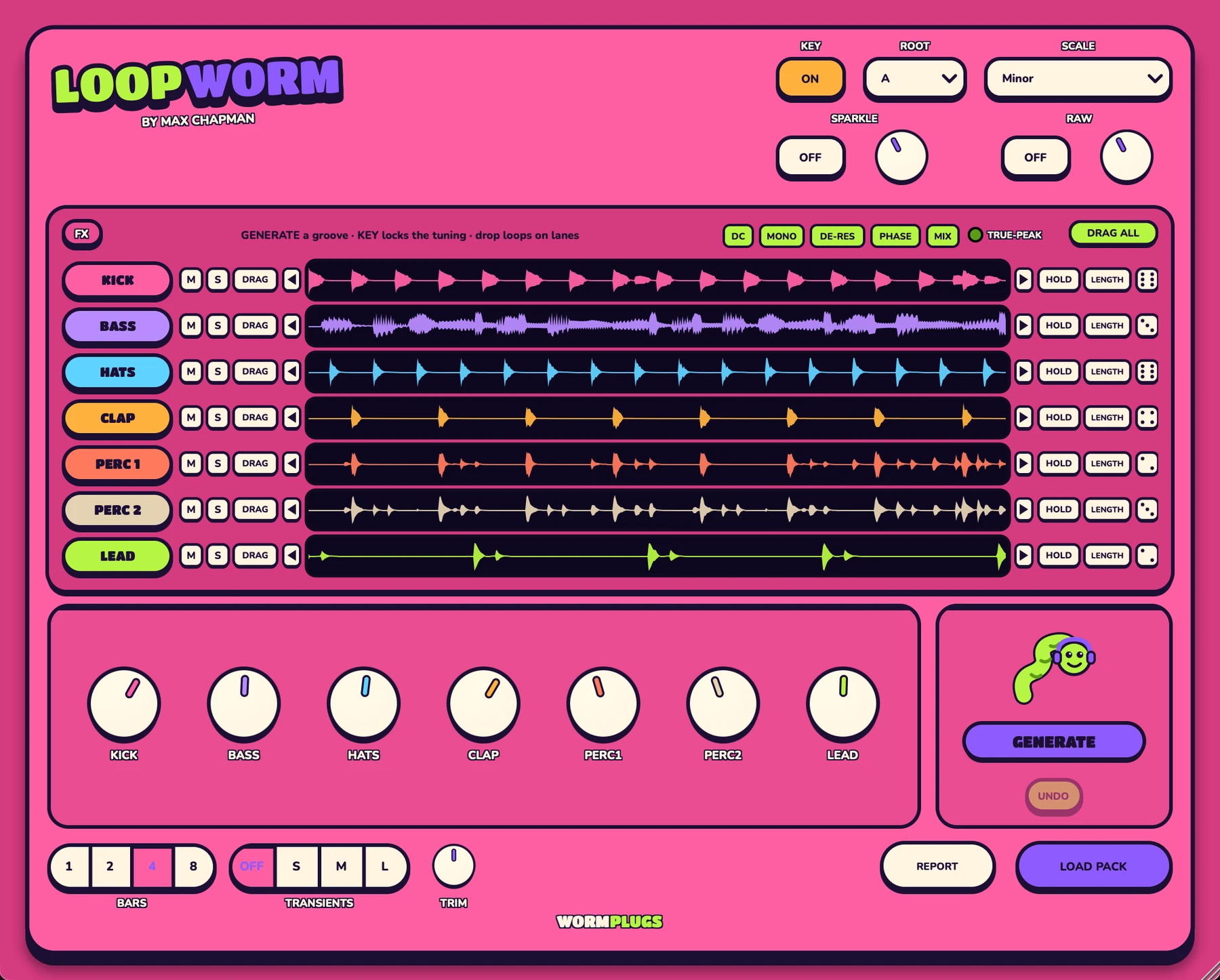
The Loopworm plugin window with a pack loaded: KEY on, ROOT and SCALE set to A
                minor across the header, and seven lanes — KICK, BASS, HATS, CLAP, PERC 1,
                PERC 2 and LEAD — each showing the waveform of the loop sitting on it, above a
                row of per-lane volume dials and the GENERATE button.
Seven lanes, one button. HOLD what you like, re-roll the rest.

What it does

macOS · VST3 & AU · Universal 2
The lanes

7 lanes, sorted for you

Kick, hats, clap, two percussion lanes, bass and lead. Every file in the pack is listened to as well as read — one-shots are skipped, textures are left out, and a loop that's filed wrong gets moved to where it actually belongs.

The button

GENERATE until it grooves

One press rolls a fresh groove across every lane. HOLD the lanes you love and re-roll the rest, or hit a single lane's dice. No two people even get the same first groove out of a pack — your record is yours.

The tuning

KEY keeps it musical

Pick a root and scale and the tonal lanes follow: bass and lead swap to loops that fit your key, tuned percussion leans into the root or the fifth, and drums are left alone. On by default, off in one click.

The tempo

Locked to your project

Every loop is tempo-locked individually, so a pack that mixes 126 and 130 BPM loops just works. Tempo comes from the filename where it's printed and from the audio where it isn't — no tagging on your side.

The blend

Add pack after pack

ADD PACK blends another pack into the pool without touching what you're hearing, so the dice draw from a mix-and-match of everything you've loaded. Your whole blend saves with the project and comes back exactly as you left it.

The finish

Shape it, then drag it out

Crop a lane to the bar you want, nudge its beats through the whole file, balance the lanes with per-lane dials and FX. Then DRAG one loop — or all of them at once — straight onto your DAW's tracks as audio.

How the demo works

  1. 24 hours, fully playable. Load packs, generate, tune, crop, nudge — the whole instrument is open. The clock starts when you first open the plugin, not when your DAW scans it.
  2. Exports are the paid part. The DRAG buttons — pulling loops out as audio — need a licence. Everything you build in the demo is still yours: activate and the same session exports on the spot.
  3. After the day is up it steps aside. The plugin goes quiet for a couple of seconds every half minute. Annoying on purpose, and completely harmless — it removes itself, never your audio. Saving, presets and automation keep working.
  4. One code, all your machines. Activation is offline, so nothing phones home and nothing breaks when you're working without a connection.

No noise bursts, no beeps, no voice tags. Nothing in a worm can make a sudden loud sound — that rule comes before every feature.

Formats

VST3 and Audio Units. Tested in Ableton Live and Logic Pro. AAX is not supported.

System

macOS 10.13 or later. Universal 2 — one download, native on Apple Silicon and Intel. Signed and notarised by Apple.

Honest limits

Loopworm is built for loops, so one-shots are skipped on purpose, and textures and FX are left out rather than given a lane. Loops longer than 8 bars are trimmed to their first 8. macOS only for now.

Support

Loopworm has a REPORT button that fills in the technical details for you — and shows you exactly what it will send, so you can delete anything you'd rather keep to yourself, before it goes anywhere.

For anything else, email us — a person reads it, not a ticket robot. Quote the build number from the plugin footer.

WORMPLUGS

Loopworm is a Wormplugs plugin by Max Chapman

© 2026 Groove Source. All plugins macOS only at present.